My Second Brain Setup is an AI Dev Tool in Disguise

The best AI tools assume you are using a laptop. Claude Code, Codex and Cursor are all designed for someone chained to a desk with a big monitor and a mechanical keyboard. I am increasingly interested in ultra-portable computing, so that is not me.
I use Obsidian as a second brain. My vault contains markdown files for notes, research, product ideas and planning. Obsidian is built around Steph Ango’s file over app philosophy, so your notes stay as plain text files you own, rather than data trapped in an app.
What I have been looking for is an AI that collaborates on that second brain: reading notes, doing research, and helping me update and organise files. Think of it as a brilliant co-worker who actually reads the docs.
I have tried a few approaches:
- Google Gemini does great research, but it cannot write back to your vault.
- Obsidian AI plugins are broad and capable, but mostly designed for desktop workflows.
- Cursor Web Agents are great for background tasks, as I wrote in Cursor Cloud Agents While You Sleep, but they are not built for real-time conversation.
Each option gets one thing right and fumbles the rest. Cursor came closest for me on my MacBook, but as an IDE it was never designed to be used from a phone. So I ran an experiment: using Claude Code, a command-line tool built for software engineers, as a mobile AI collaborator for my notes. It is a niche setup, but it works better than I expected.
The setup
Claude Code runs on my MacBook with access to my Obsidian vault. Tailscale creates a private network so my iPhone can reach the Mac from anywhere, and SSH connects them. A tool called tmux keeps the session alive when the phone disconnects, so I can pick up mid-conversation after losing signal or locking the screen.
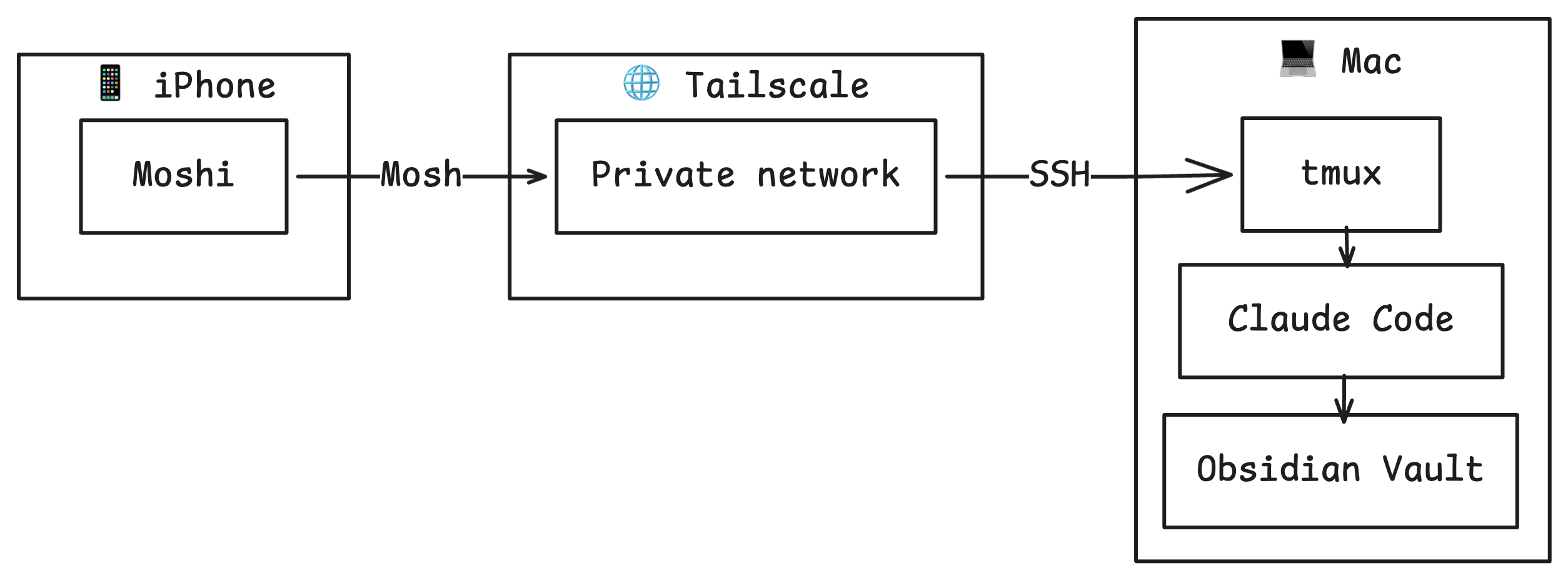
Tailscale gives the Mac a stable private IP without opening firewall ports. Moshi is a free iPhone app that connects via the Mosh protocol, which handles Wi-Fi drops and phone sleep better than plain SSH. Total setup time was about 30-60 minutes, most of which was me second-guessing whether I really needed tmux (I did).
You can optionally add a CLAUDE.md file in your vault root. Claude Code picks this up automatically at the start of each session, like handing a new colleague a short briefing before a meeting. It tells Claude how your vault is structured, what writing style to use, and where files should go.
The core use case works well. Claude reads and writes vault files, conducts research, follows note structure, and places new files in the right folders (most of the time). The Mac and iPhone can share the same tmux session, so you can lock your phone mid-conversation and continue later from your laptop at exactly the same point.
What was clunky
Typing on an iPhone in a terminal is about as fun as it sounds. Moshi does local echo prediction so characters appear instantly, but the keyboard is still the bottleneck for anything longer than a short prompt. Small iOS keyboard behaviors like double-space for a full stop do not work in Moshi, which becomes annoying very quickly.
Scrolling in the terminal also needs setup. The fix is to enable mouse mode in tmux, after which swipe scrolling in Moshi works as expected. Copying text on Mac can be awkward too, tmux intercepts mouse events and can break normal click-drag selection.
After enough frustration, I switched from Terminal to iTerm2 on the Mac. It performs better and handles tmux integration more gracefully. In particular, Claude Code’s own scrolling behavior seems more reliable there.
Another limitation was hitting the Claude usage cap mid-session. Anecdotally, it feels like the daily Claude usage quota can disappear faster than Cursor.
The biggest limitation overall is reading files that Claude creates or updates. There is no rendered markdown preview in a terminal. If you have Obsidian Sync you can check output in the Obsidian mobile app, but sync can lag, so sometimes you end up staring at the previous version and wondering if anything changed.
If you run a privacy VPN like Mullvad on your iPhone, be aware it conflicts with Tailscale. iOS only allows one VPN active at a time, so you need to toggle one off.
The bigger picture
There are natural comparisons with OpenClaw, a highly configurable assistant that runs on your own server or hardware and connects through Telegram. The concept is compelling, but in my testing it involved even more config wrangling and commands such as openclaw gateway restart.
The bigger takeaway from this experiment is that the capability is already here: an AI assistant that knows your notes, researches with context, and collaborates on your files with sessions that persist between laptop and phone. It works today, but the interface is still terminal-first, and that is a barrier for most people.
To see why this matters, it helps to look at alternatives. Most tools solve part of the problem, but not all of it.
| Tool | Mobile | Real-time chat | Works with local files you control | Model quality |
|---|---|---|---|---|
| Claude.ai Projects | Yes | Yes | No | High |
| Notion Agents | Yes | Partial | No | Good |
| Mem 2.0 | Yes | Yes | No | Good |
| Obsidian AI plugins | Mainly desktop | Partial | Yes | Varies |
| Google NotebookLM | Yes | Yes | No | Good |
| This experiment | Yes | Yes | Yes | High |
This experiment ticks every box for me: mobile, real-time conversation, writing back to your own files, and a best-in-class model. The catch is that setup still requires 30-60 minutes of fiddly config and a willingness to troubleshoot problems.
What’s next?
An obvious next step is moving this off a MacBook and onto an always-on server. Plenty of developers are already doing this so they can code while out and about.
The most interesting question for me is not whether this can become a product, it clearly can. The question is why nobody has made this feel frictionless yet.
The setup in this article:
- Claude Code (Pro, $20/mo)
- Tailscale (free)
- tmux (free)
- Moshi (free)
- Obsidian Sync (optional, $10/mo)
Total monthly cost: $20-30
If you'd like to contact me then you can email writing@petegraham.co.uk.